What is GameShare on Switch 2?
GameShare lets one Nintendo Switch 2 share a game with up to three other consoles, so only one of you has to own it.
The catch: a Switch 1 can only join from the same room. Over the internet, every console in the session has to be a Switch 2.
Can you GameShare from a Switch 2 to a Switch 1?
Yes, in the same room.
| In the same room | Online, through GameChat | |
|---|---|---|
| Switch 2 shares a game it owns | Yes | Yes |
| Switch 2 joins as a guest | Yes | Yes |
| Switch joins as a guest | Yes, over local wireless | No |
| Switch shares a game | No | No |
Nintendo says some Switch 2 games suit a Switch badly because of the accessories or controls they need.
Which games support GameShare?
51 games with a GameShare tag on Nintendo's US store
- Absolum Same room Online
- Beyond the Dark: Nightwatch Same room Online
- Big Brain Academy: Brain vs. Brain Same room Online
- Brotato Same room OnlineGame page →
- Captain Toad: Treasure Tracker Same room OnlineGame page →
- Chillin' by the Fire Same room Online
- Clubhouse Games: 51 Worldwide Classics Same room OnlineGame page →
- Culdcept BEGINS Same room Online
- Donkey Kong Bananza Same room OnlineGame page →
- Donkey Kong Country Returns HD Same room Online
- EA SPORTS FC 26 Same room OnlineGame page →
- EA SPORTS FC 27 Same room Online
- eFootball Kick-Off! Same room Online
- Fast Fusion Same room Online
- Fitness Boxing 3: Your Personal Trainer Same room Online
- Goat Simulator 3 Same room OnlineGame page →
- Heave Ho 2 Same room Online
- Human Fall Flat Same room OnlineGame page →
- Hyrule Warriors: Age of Imprisonment Same room Online
- It Takes Two Same room OnlineGame page →
- Kirby Air Riders Same room OnlineGame page →
- Lynked: Banner of the Spark Same room Online
- Mario Tennis Fever Same room Online
- MARVEL Cosmic Invasion Same room Online
- Mortal Kombat: Legacy Kollection Same room Online
- NBA 2K26 Same room OnlineGame page →
- NBA 2K27 Same room Online
- Orbitals Same room Online
- Overcooked! 2 Same room OnlineGame page →
- Pikmin 3 Deluxe Same room OnlineGame page →
- Plants vs. Zombies: Replanted Same room Online
- Pokémon Pokopia Same room Online
- Puyo Puyo Tetris 2S Same room Online
- REANIMAL Same room OnlineGame page →
- Rotwood Same room Online
- Scott Pilgrim EX Same room Online
- Sea of Stars Same room OnlineGame page →
- Split Fiction Same room OnlineGame page →
- Star Fox Same room Online
- Stardew Valley Same room OnlineGame page →
- Suika Game Planet Same room Online
- Super Bomberman Collection Same room Online
- Super Mario 3D World + Bowser's Fury Same room OnlineGame page →
- Super Mario Bros. Wonder Same room OnlineGame page →
- Super Mario Odyssey Same room OnlineGame page →
- Super Mario Party Jamboree Same room OnlineGame page →
- Survival Kids Same room Online
- Teenage Mutant Ninja Turtles: Splintered Fate Same room Online
- Tokyo Scramble Same room Online
- WWE 2K25 Same room Online
- WWE 2K26 Same room Online
When a game has a Switch 2 Edition, the tag is on that edition's page. Nintendo says the list keeps growing.
How do you start GameShare on Switch 2?
The host starts it from the game, usually from its main menu. The steps differ by game, and Nintendo's support site has a "How to Start a Multiplayer Game" page for each one.
GameShare with friends in the same room
- HostStarts GameShare + Local Play from the game's menu
- GuestSelects the GameShare icon on the HOME Menu, then Join GameShare and A Local User
- GuestPicks the host's user and the session it finds nearby
- HostStarts the session when everyone has joined
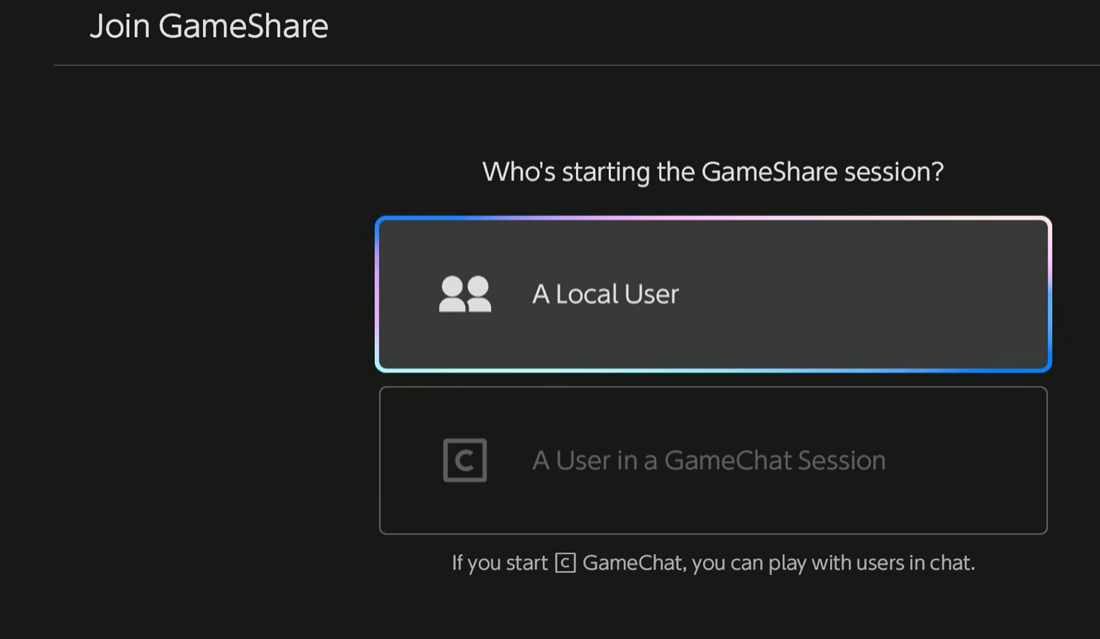 Step 2: A Local User
GameShare with friends online
- HostStarts a GameChat room, or starts one while inviting friends to the session
- HostOpens the game and starts GameShare from its menu
- GuestPresses the C Button, selects See Invites to GameShare, then Join GameShareOr the GameShare icon on the HOME Menu, then A User in a GameChat Session.
- HostStarts the session when everyone has joined
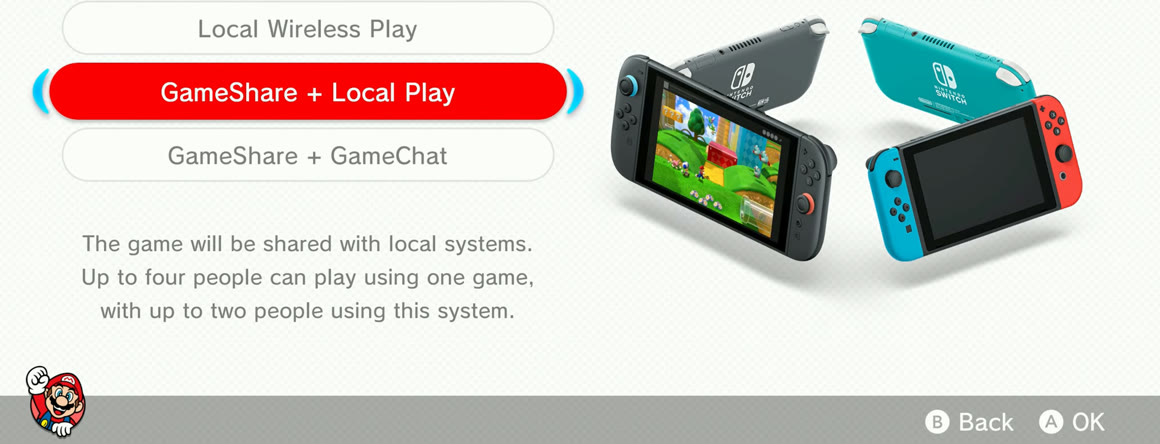 Step 2: GameShare + GameChat
What do you need for GameShare, and what are the limits?
Up to four consoles play from one copy, the host's included. Each game sets its own modes and number of players.
| HostOwns the game | GuestUp to 3 | |
|---|---|---|
| Console | Switch 2 | Switch 2, or a Switch in the same room |
| Owns the game | Yes | No, plays while the session lasts |
| Latest system update | Needed | Needed |
| Nintendo Switch OnlineGameChat needs it since March 31, 2026 | To share online | To join online |
| Image quality | Lower: streamed from the host, and online can lag | |
| Age rating | Their own restriction still applies | |
| Records video | Not on a Switch | |
| After the session | Can't keep playing |
The update is in System Settings, then System, then System Update. After the session, the game's icon stays on the guest's HOME Menu with a link to the eShop, and some games leave save data for the full game.
When do you need GameShare, and when don't you?
One copy, a console each
Only one of you owns the game and everyone has their own Switch 2 or Switch nearby.
One console on the couch
A game with split screen takes one console and one copy. Super Mario Party Jamboree plays four on one screen.
Split-screen games on Switch →Everyone owns the game
Its own online mode usually lets in more people. Jamboree takes 2 to 8 online, against GameShare's four consoles.
Co-op games on Switch →Playing apart on a Switch 1
Online sharing needs a Switch 2 and Nintendo Switch Online on both ends. Room-only games like Split Fiction need everyone in one room.
The Switch 2 filter on our all-games page shows every game that runs on a Switch 2, including Switch games that also run on it.
Other questions
Is Mario Kart World on GameShare?
No. Mario Kart World, Mario Kart 8 Deluxe, Super Smash Bros. Ultimate, Splatoon 3 and Mario Party Superstars have no GameShare tag on Nintendo's US store.
How do you check if a game has GameShare?
Open the eShop, go to Search/Browse, scroll down to Filtered Search and turn on the two GameShare filters under Gameplay Style.
Does GameShare work the same in every game?
No, each developer decides how it works. In Clubhouse Games: 51 Worldwide Classics, each player gets a different screen in card games and mahjong, so nobody sees another hand.
Can one GameChat room run more than one GameShare session?
Yes, with different games. GameChat is generally limited to people on your friend list.